


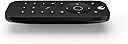
Xbox One Media Remote
Product ID: 182174
🎮Xbox & Windows 10 compatible
📡30 ft IR range
🔆motion-activated backlit buttons
🎬 Elevate your Xbox experience—control everything with one sleek remote!
The Xbox One Media Remote is a compact, ergonomically designed infrared remote compatible with Xbox One X, S, Series X, and Windows 10. Featuring a 30-foot range, motion-activated backlit buttons, and a dedicated OneGuide button, it simplifies control of Blu-ray, streaming apps, TV power, and volume. This remote replaces multiple devices, offering a seamless, intuitive entertainment experience tailored for modern living rooms.


| ASIN | B00IAVDPSA |
| Additional Features | wireless digital |
| Battery Type | Alkaline |
| Best Sellers Rank | #29,840 in Video Games ( See Top 100 in Video Games ) #2,468 in Xbox One Games, Consoles & Accessories |
| Brand | Microsoft |
| Built-In Media | remote |
| Button Quantity | 9 |
| Color | red |
| Compatible Devices | Television |
| Connectivity Technology | Infrared |
| Controller Type | Button Control |
| Customer Reviews | 4.5 4.5 out of 5 stars (2,981) |
| Global Trade Identification Number | 00885370604290, 00885370604306, 04988648976276 |
| Item Type Name | Conditional Access Module |
| Item Weight | 0.4 Pounds |
| Manufacturer | Microsoft |
| Maximum Number of Supported Devices | 1 |
| Maximum Range | 30 Feet |
| Mfr Part Number | 6DV-00005 |
| Model Name | Xbox One Media Remote |
| Model Number | 6DV-00005 |
| Number of Batteries | 2 AAA batteries required. |
| UPC | 885370817706 012301019001 667649419473 885370604306 885370604290 |
| Unit Count | 1.00 Count |
J**S
Very small, great curved ergonomic shape. Feels like something Apple might have designed. Replaces my logitech harmony remote
*** Update **** Not 3 days after purchasing the remote, I started experiencing a problem with the Volume buttons not working properly, which apparently may be a widespread problem and not just an isolated bug. The volume button does not always register when pressed. I have to repeatedly press the power button and it may be detected maybe only every other push. Also If I just hold down the volume button, It's only adjust the volume up or down a little, then a pause, then a little more, then a pause, then a little more. Very annoying little bug if your relying on this remote for volume control. I've dropped from 5 stars to 4 stars. I still really like the remote but I do expect the volume to work normally and will have to contact microsoft about this issue. Maybe a bigger drop in stars is incoming if I don't resolve this problem. ****// End Update **** The remote is about half the height of the 360 media remote. Very straight forward and easy to use. Has a soft touch feel that feels really good. The downside of the soft touch material is that it is a bit of a lint magnet. Remote picked up lint just from the packaging it came in and I had to wipe it clean first thing. I'm still quite happy with the soft touch and think it will be great in the long run. The remote also has a sensor that turns on the backlighting when you pick it up without you having to do anything. The back light then very gracefully fades after about 5-7 seconds when the remote is placed down again. Very slick and the design akin to something Apple might do. Very good on Microsoft here. To turn on Xbox you long press the Xbox logo button on the remote. This is so much better than using the Xbox One controller as your remote control. It's just less work. Easier to pickup and use one handed. Easier than talking to Kinect all the time...although I still enjoy talking for certain things like Pausing a video or opening an app. A great solution for the non-gaming family members to interact with the Xbox with easily and without clunkiness. It seems like many don't know this, but the Xbox One has an IR blaster in the Kinect device. You can program your Xbox One to control your specific TV and Receiver / Amplifier, or your Cable TV, via the IR blaster. You don't have to run any special cables or anything, the Kinect just bounces high power IR signal around your room and it gets back to your TV, receiver, cable box...etc. You can even control your Amplifier / Receiver audio volume from the Xbox One Media Remote! It works unbelievably well. Go into your Xbox One settings > TV & One Guide > Devices. If you want to change the increment of how much the Xbox One increases or decreases your volume (when controlling by voice), follow these instructions: Go to the Xbox One settings app Go to TV & OneGuide "Troubleshooting" "Audio" "Volume Change" Again the above instructions are only for voice control, "Xbox Volume Up". The media remote only does volume control by standard +/- 1 unit of audio and can NOT be adjusted by the above increment settings. So for my fairly straight forward setup where I only use the Xbox One for games, Blu-Ray, and streaming media, I now don't need my Logitech Harmony Remote anymore, or any other remote. This media remote is my ONLY remote! I have a love hate relationship with the Logitech Harmony. With the One remote, my setup no longer needs it!!! My wife will now be able to easily turn on the TV without issues, and unlike the Logitech harmony remote which you had to carefully keep pointing at the TV / Amp / Cable box till it finished all it's commands, lest it get out of sync and be a headache to fix...the Xbox One sends such a powerful blast of IR out to your other devices, that you don't have to think about how long you point the remote. This is a huge feature that the Xbox One has that the PS4 does not. It's one of the features made possible by the Kinect device.
D**N
Not Another "Cheap Accessory"
So, you're thinking, "that's just another accessory that I don't really need." No, trust me, this thing is AWESOME. First of all, it feels great; the coating is a soft rubber that surrounds the entire remote. I've actually never felt another remote like it. Next, the button back lights fade in and out and come on whenever the remote is moved. If you pick it up, the lights come on. When you put it down on your coffee table, they fade out after a second or two. It really gives the impression of a "living device." The functionality of this thing is also great. There are all the buttons you need, but it isn't cluttered up by giving you a button for every function (see the PS3 media remote). Everything is well placed, and it is intuitive to use. Here's the great thing: if your Xbox One is set up to control your TV and your audio receiver, this remote will work them too! So, this has become the one universal remote that's actually ever worked for me. I just push one button and everything comes on. I can select what I want to watch, and adjust the volume all from the same remote. This has replaced a TV remote, Xbox controller, and audio receiver controller with one device. My coffee table went from having remotes all over it to just one, small, well-designed remote. Though it may seem like just another add-on, Microsoft really spent some time and effort here, and it shows. If you have an Xbox One and watch a lot of video on it, this is a "must buy."
B**N
Absolute Must if you watch a lot of video on your Xbox One
My main reason I got my Xbox One was to watch movies on it, via 4k Bluerays as well as streaming. While you can use the standard Xbox controller to watch movies it's really not practical or easy to do. First i looked at this product, was not sure about the price point, browsed some 3rd parties reading reviews and went back to this and said F it lets get it and i'm glad I did. The build quality is exceptional. Its very sturdy and nice to hold in the hand with a slightly rubberized texture for a no slip grip. The buttons feel very nice and have a quality feel when pushing them down. The buttons all automatically light up when the controller is lifted or moved for easy visibility in any lighting conditions. You can set it up so the volume control on the remote will work with either your TV or a Surround Receiver. There is the normal X box button on it which you can activate and you can navigate normal Xbox menus with this if you needed to. You have all the other normal buttons on a remote, fast forward rewind pause, you can also do a quick skip or rewind when watching in apps like netflix. All in all it's a nice remote and worth the investment especially over the cheaper generics. I wouldn't hesitate to make the purchase again should I ever need another.
B**T
Puts the "One" in Xbox One
I was really unsure about this remote before buying it. I wanted a remote that could control my sound system, TV and Xbox from one remote. I was bit worried because it looked like a very simple remote, it doesn't have alot buttons. Also, I saw some reviews saying that it doesn't work with certain apps, some reviews said that it has issues controlling volume, and even some reviews saying that it doesn't work at all! However, I bought one anyway and much to my surprise it met all of my expectations, and even surpassed them! Don't let the simple design fool you, this remote can control everything, your TV, sound system, Xbox, and even your cable box if you have one. The minimalist design is actually what makes this awesome. You only need to press one button to turn on everything. Pressing the xbox button on the top turns on all of your devices at the same time. It is super convenient! The volume buttons work great with my Sony surround sound system. I am able to control all of my media apps, Amazon Netflix Youtube, Pandora, etc with ease, and the bluray player and oneguide also work great with this remote. Note: you will need an IR blaster to get full use out of this. If you have the new Xbox One S, like I do, the Ir blaster is built in, so you won't have to worry about it. But if you have an older Xbox One, you'll need a Kinect, or an IR extender. This remote basically turns my Xbox One into a device that can be seamlessly be used for everything! Games, movies, music, and TV. It really is an all in "One" solution.
J**E
I'd buy it again
I suspect I might be in the minority of Xbox One users... in that I don't game on it much. I generally prefer PC gaming over consoles. You might be wondering why I have an Xbox One, then. In point of fact, the media integration features of the Xbox One were more appealing to me than the gaming aspect. The console plays Blu-rays, has apps for Netflix, Amazon Instant Video, Hulu and Vudu, my DirecTV DVR plugs into it and it's able to control the TV and receiver via the Kinect's IR blaster. It is literally the command center of my entertainment system, and I am mostly pleased. One of the larger complaints I've had is that, to power on all of the components, I had to either use multiple remotes... or use voice commands via the Kinect. I typically have good luck with voice commands, but there are times when it's just not convenient. Plus, my reluctance to use voice commands to control volume or change channels meant keeping the DirecTV remote on hand. Enter the Xbox One Media Remote. The device itself is compact, but has a pleasant feel to it. Compared to the Logitech Harmony One I use on the projector upstairs, it's absolutely tiny and pleasantly lightweight. The backlighting looks great, though I wish the accelerometers that activate the lighting were more sensitive... and that the light stayed on a bit longer. There aren't a ton of buttons, but most of the basics are there. I'm able to turn the system (and all components) on or off via the remote, which is a welcome addition. The volume buttons, appropriately, control the receiver... the channel buttons control the DVR. The directional keys work as expected. That being said, there's one omission which is more of an intentional tactic on Microsoft's part than any kind of oversight: their guide button, when watching TV, brings up Microsoft's One Guide, instead of the built-in guide for DirecTV. For various reasons, I prefer the DirecTV guide... but the only way to access it is with the DirecTV remote. Perhaps if I force myself to use One Guide, I'd get used to it and begin to like it. But I haven't taken that step yet. I wish it were possible to "reprogram" certain buttons on the Xbox One Media Remote, depending on context. For instance, if I'm watching TV... I'd like the guide button to use DirectTV's guide. And I'd like to be able to reprogram one of the other buttons to launch the Menu in DirecTV or, even better, the recorded shows on the DVR. I think the inability to control DirecTV's (or other programming providers') set top box is likely a result of Microsoft's desire to control as much of the entertainment experience as possible. Typically, I don't mind that... but live TV (via DirecTV, for example) is an innately out-of-console experience. I look forward to the day when I don't need any sort of satellite or cable programming at all. When that day comes, the Xbox One and the Media Remote will literally be the only remote I need in my living room. For now, I still need to keep the DirecTV remote on hand for occasional use. But 90% of the time, the Media Remote is the one I pick up.
M**F
Save Your Controller's Battery and Make Your Life Easier!
I am SO happy that I bought this remote! It's a life saver as my girlfriend loves to use my Xbox for watching Netflix and Hulu all of the time, and I hate when the controller batteries die when I'm playing a game! Before I bought this remote, we always just used the regular Xbox controller when streaming movies or TV shows. Sometimes you actually want to have basic functions (pause, fast forward, etc.) while watching, so the only answer was to leave the controller on at all times, keep it on the bed next to you, and drain the batteries. Even with rechargeable batteries, I still want to plug my controller in as little as possible, so this remote is GREAT! The triggers on the regular controller seem to be incredibly sensitive, so that when we are watching stuff together, if either of us moved the tiniest bit on the bed, our show would just start fast forwarding or rewinding. Then we would have to scramble around to grab the controller and bring the show back to where it was. Once I got the Elite controller, it got even MORE annoying with the buttons on the back always stopping the show. I had to do something because we were getting pretty annoyed by all of this... and that's where this remote comes in! I have had this remote for months and will nearly constant use, it's still going strong with the same batteries it came with. The remote only lights up when you move it, which is a great feature, because I don't ever need to turn on the lights to see what I'm doing, and it doesn't drain battery when you're not actually using it. Fantastic!
R**N
I wanted to love this remote but it just has too many shortcomings.
I so wanted to love this remote but it just had too many shortcomings. I am a proud Microsoft fan and have owned all the video game systems (four Xbox 360 in fact). I was hesitant to buy this remote with the lack of number pad, but I needed to get a new remote as my Harmony was going out. Surprisingly I was able to get over the lack of number pad and did not miss it when navigating the One Guide for the TV pass through on the Xbox One. The remote it self is well made and a nice size. It is bigger than the super flat Apple TV remote and fits my hand very well. It has a soft plastic texture that is a bit funny and take some getting used to, but has a very good look to it. The buttons feel nice, and other than the mute button, they are all easy to find with the feeling of your thumb. It was easy to program as it is already set up for the Xbox One and it is the Xbox One that needs to be set up to control your TV, Cable Box, and A/V Receiver. Mine was already set up for my devices as I had programed it when I originally set up my Xbox One. It can open up the Xbox one home and you can access and use it on all the common apps like Netflix, Hulu, Amazon, and the like which is what I needed this for. I did not expect it to be able to pull up my Cable Box menus, guide, or DVR list but I did hope there was some magical option with this remote so I would have only docked it 1/2 start for that. I wanted to use this remote as my main remote, as I jump back and forth between Netflix/Hulu and Cable a lot, and use my Cable Box remote as a complement with watching DVR recordings. All was going well and I was ready to switch to this remote full time and use it as my primary remote until I needed to run to the bed room and tried to pause the TV show. I found out the hard way that the Play/Pause, FF/RW, buttons do not work with my cable box. I had to dock a full 1.5 starts for this too. I dont understand how these buttons dont work when the Xbox One app and my old Logitech Harmony Remote is able to use these function through the Xbox One. I was almost ready to use this as my only remote but I could not do so with out this function.
M**H
Perfect Addition For Netflix Users And The Like!
This thing is a lifesaver if you or someone in your home uses the Xbox One for Netflix or general film/movie/video entertainment on a very consistent basis. It eliminates the use of the controller when using Netflix, YouTube or watching a disk on the Xbox. The remote itself is very small and doesn't take up much space, and only requires two AAA batteries and it operates just like a real TV remote would in that it is only "on" when you're using it. The buttons on the remote are also backlit and will light up when the remote is moved, or there is motion over top of it. It sends a standard IR remote and sends to the front of the Xbox. The buttons feel very nice and I doubt will wear hardly at all with time. My only complaint with this remote is that, unless you have the set-top box thing passing through the Xbox One, the volume controls don't do anything, which means you'll still need the TV remote handy, but it's still better than navigating the menus using the controller, as great as the controller is. Definitely worth the purchase for a household that uses Netflix and the like a lot.
K**T
my favourite Xbox accessory
I honestly can't believe they discontinued these things. I use my Xbox as a media centre and I couldn't live without this remote. No more having to re-connect my controller just to hit pause on a movie. No more monkey-ing around trying to rewind youtube videos. No more accidentally hitting the wrong buttons (that may just be me...). This thing automatically turns itself on when it feels you pick it up (or when you push a button), and the controls are simple and straightforward. No need to pair it with a specific system either, simply point it at any Xbox One and it'll control it. And because it automatically puts itself to sleep after a few seconds of no use, the battery life is fantastic. It's very small, about half the size of most TV remotes, and feels well constructed. Decent range, but does require line-of-sight to the system.
S**Y
Excelente producto
Lo recomiendo ampliamente, el producto es de excelente calidad, con un diseño ergonómico y practico, igualmente cuenta con luces en los botones que se prenden al tomar o mover ligeramente el control para facilitar su uso en la oscuridad, muy funcional para cuando no quieres utilizar el control de juego.
L**N
Muy práctico
En cuanto al precio y al envío como siempre Amazon no deja nada que desear, su servicio es excelente y siempre tienen buenos descuentos. En cuanto al producto es muy práctico, es excelente para ver películas y estar en netflix, los botones se iluminan en cuanto tomas el control y tiene una textura muy agradable al tacto. Lo recomiendo ampliamente para mejorar la vida útil de las baterías de tu control y si eres de los que ven muchas películas con el Xbox.
K**Y
Just what we needed!
We watch a lot of TV/Movies through the Xbox One. If we ever needed to pause it quickly, we'd have to slowly turn the controller back on and then fiddle with it to hit pause. Or we'd have to leave it on during the entire movie, which wasted tons of batteries. With this remote it's super easy to pause, rewind, fast forward, mute and adjust the volume. You can even turn the Xbox on and off with it. Oh and the best feature of all, it is nicely back lit and only turns on when you pick it up! Once you set it back down, the the back lit keys slowly fade off. It's a beautiful little remote!
M**O
Nice quality
Feels amazing. Been using for a wile now and it dosn't wear off like I expected it to. Functional and has very nice motion activated back light. I use it for anything other than gaming. Nice to be able to just grab it and not fuss with turning a controller on. Also doesn't put unnecessary wear on your controller. Only complaints I have is that iv found the underside of the remote sometimes slides off the expose the batterys without intending to. You also need to hold it at funny angles sometimes to get it to work. I know the sensors not just took some getting used to. Worth the buy if you use your Xbox as your media center.
Trustpilot
2 weeks ago
3 days ago